> ## Documentation Index
> Fetch the complete documentation index at: https://docs.decoart.com/llms.txt
> Use this file to discover all available pages before exploring further.
# Production Tracking Reference
## Key Batch Information
Each batch ticket contains:
* `WIP Part Number`: The work-in-process part being produced.
* `Unit of Measure`: Production measurement units.
* `Standard Yield`: Expected production output.
* `Scheduled Yield`: Planned production quantity.
* `Production Week`: Target production timeframe.
* `Special Instructions`: Custom manufacturing notes.
* `Batch Number`: Unique identifier for tracking.
## Batch Status Categories
Batch tickets can have various status designations that indicate their current stage in the production process:
### Production Statuses:
* `Scheduled`: Batches created and scheduled for production.
* `Printed`: Batch tickets printed for production floor use.
* `In Process`: Batches currently being manufactured.
* `Ready to Tint`: Batches ready for color tinting.
* `Complete`: Finished batches.
### Quality Control Statuses:
* `Pending QC`: Batches awaiting quality control testing.
* `QC Delayed`: Batches experiencing QC testing delays.
* `QC Rejected`: Batches that failed quality control standards.
### Post-QC Statuses:
* `Dispersed`: Batches completed and ready for bottling.
* `Bottling Begun`: Batches in bottling operations.
* `Bottling Hold`: Batches temporarily on hold during bottling.
* `In Consignment`: Batches in consignment status.
### Exception Statuses:
* `Dispersion Delayed`: Batches experiencing production delays.
## Bulk Batch Functions
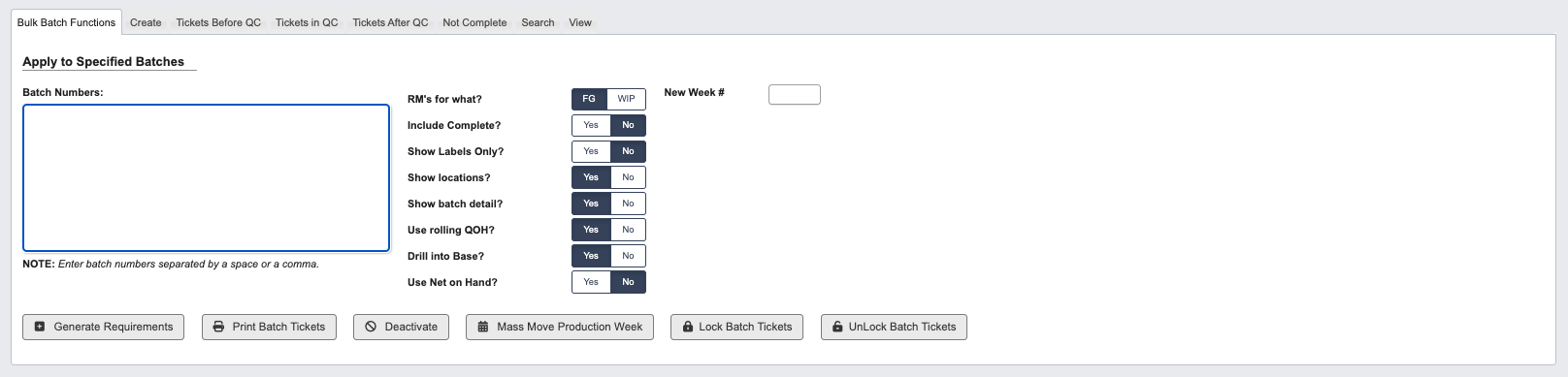
The Bulk Batch Functions tab allows you to perform operations on multiple batch tickets simultaneously, improving efficiency when managing large production schedules.
 ### Apply to Specified Batches:
Configure bulk operations by setting the following parameters:
* `Batch Numbers`: Enter batch numbers separated by spaces or commas.
* `RM's for what?`: Specify if raw materials are for Finished Goods (FG) or Work-in-Process (WIP).
* `Include Complete?` (Yes/No): Choose whether to include completed batches in the operation.
* `Show Labels Only?` (Yes/No): Display only label information when generating results.
* `Show locations?` (Yes/No): Include location data in the output.
* `Show batch detail?` (Yes/No): Display detailed batch information in results.
* `Use rolling QOH?` (Yes/No): Apply rolling quantity-on-hand calculations for inventory.
* `Drill into Base?` (Yes/No): Include base material details in the analysis.
* `Use Net on Hand?` (Yes/No): Apply net-on-hand inventory calculations.
* `New Week #`: Assign new production week number for rescheduling batches.
Buttons:
* `Generate Requirements`: Generate table with material requirements for selected batches.
* `Print Batch Tickets`: Print physical tickets for production floor use.
* `Deactivate`: Remove batches from active production.
* `Mass move Production Week`: Reschedule multiple batches to different production weeks.
* `Lock Batch Tickets`: Prevent modifications to batch tickets.
* `UnLock Batch Tickets`: Allow modifications to previously locked tickets.
## Batch Search Options
### Available Filters
* `Status(es)`: Filter by one or multiple production statuses.
* `WIP Part #`: Search by work-in-process part number.
* `Direct RM / Base`: Filter by raw material or base components.
* `Batcher`: Search by assigned production personnel.
* `Include base tickets?` (Yes/No): Include or exclude base batch tickets.
* `Base Batch #`: Search by base batch number.
* `Batch ticket created`: Filter by creation date.
* `Dispersion release date from`: Filter by dispersion completion date.
* `QC release date from`: Filter by quality control completion date.
* `Complete date from`: Filter by final completion date.
## View Batch Ticket
### Apply to Specified Batches:
Configure bulk operations by setting the following parameters:
* `Batch Numbers`: Enter batch numbers separated by spaces or commas.
* `RM's for what?`: Specify if raw materials are for Finished Goods (FG) or Work-in-Process (WIP).
* `Include Complete?` (Yes/No): Choose whether to include completed batches in the operation.
* `Show Labels Only?` (Yes/No): Display only label information when generating results.
* `Show locations?` (Yes/No): Include location data in the output.
* `Show batch detail?` (Yes/No): Display detailed batch information in results.
* `Use rolling QOH?` (Yes/No): Apply rolling quantity-on-hand calculations for inventory.
* `Drill into Base?` (Yes/No): Include base material details in the analysis.
* `Use Net on Hand?` (Yes/No): Apply net-on-hand inventory calculations.
* `New Week #`: Assign new production week number for rescheduling batches.
Buttons:
* `Generate Requirements`: Generate table with material requirements for selected batches.
* `Print Batch Tickets`: Print physical tickets for production floor use.
* `Deactivate`: Remove batches from active production.
* `Mass move Production Week`: Reschedule multiple batches to different production weeks.
* `Lock Batch Tickets`: Prevent modifications to batch tickets.
* `UnLock Batch Tickets`: Allow modifications to previously locked tickets.
## Batch Search Options
### Available Filters
* `Status(es)`: Filter by one or multiple production statuses.
* `WIP Part #`: Search by work-in-process part number.
* `Direct RM / Base`: Filter by raw material or base components.
* `Batcher`: Search by assigned production personnel.
* `Include base tickets?` (Yes/No): Include or exclude base batch tickets.
* `Base Batch #`: Search by base batch number.
* `Batch ticket created`: Filter by creation date.
* `Dispersion release date from`: Filter by dispersion completion date.
* `QC release date from`: Filter by quality control completion date.
* `Complete date from`: Filter by final completion date.
## View Batch Ticket
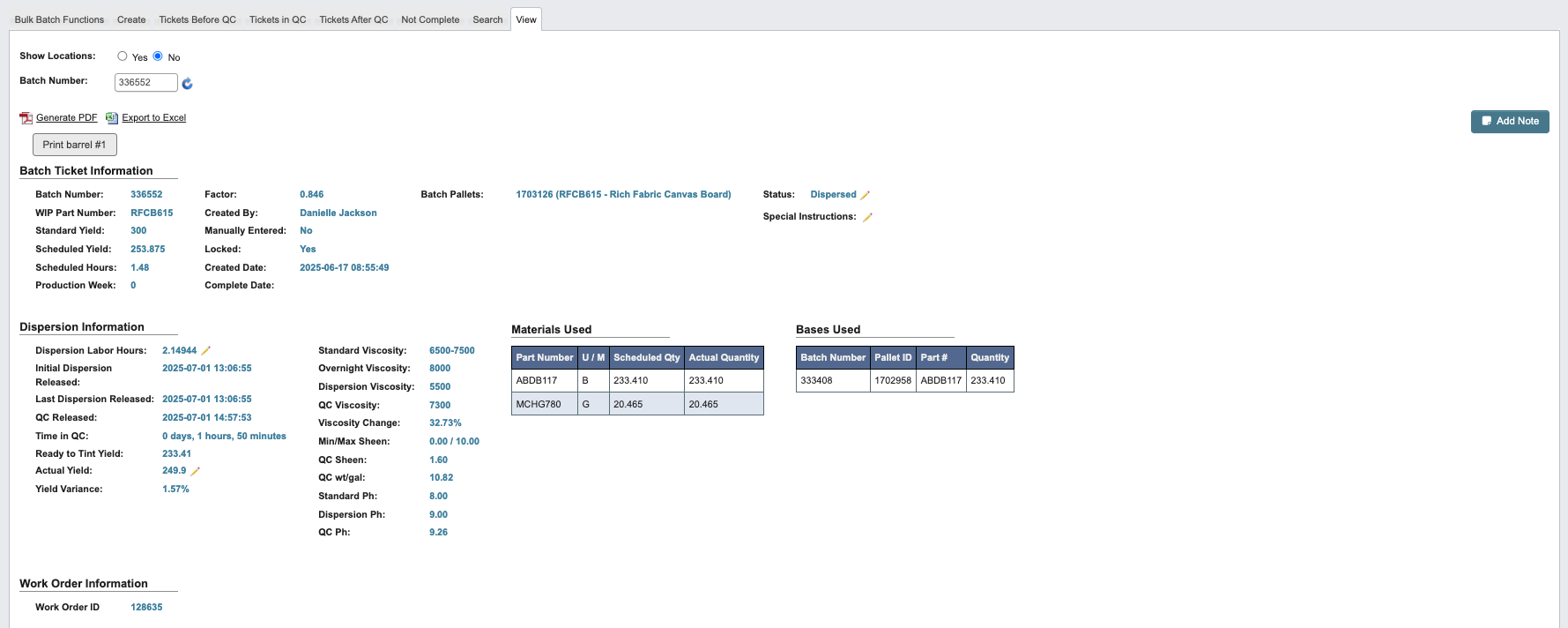 * `Show Location` (Yes/No): Include location data in the output.
* `Batch Number`: Enter batch number.
* `Generate PDF`: Link to Generate a PDF of the Batch Ticket.
* `Export to Excel`: Link to Export the Batch Ticket to an Excel spreadsheet.
### Batch Ticket Information
* `Batch Number`: Enter batch number.
* `WIP Part Number`: Search by work-in-process part number.
* `Standard Yield`: Expected production output.
* `Scheduled Yield`: Planned production quantity.
* `Scheduled Hours`: Estimated time required to complete the batch production.
* `Production Week`: Target production timeframe.
* `Factor`: Production scaling factor applied to the batch calculations.
* `Created By`: User who created the batch ticket.
* `Manually Entered`: Indicates if batch data was entered manually rather than system-generated.
* `Locked`: Locked Batch Ticket prevents further modifications.
* `Created Date`: Date and time when the batch ticket was created.
* `Complete Date`: Date and time when the batch was completed.
* `Batch Pallets`: Number of pallets associated with this batch.
* `Status` (Editable): Production Status
* `Special Instructions` (Editable): Additional instructions for this batch.
### Dispersion Information
* `Dispersion Labor Hours` (Editable): Total labor hours spent on dispersion operations.
* `Initial Dispersion Released`: Date and time when the batch was first released from dispersion.
* `Last Dispersion Released`: Date and time of the most recent dispersion release.
* `QC Released`: Date and time when quality control testing was completed and batch was released.
* `Time in QC`: Duration the batch spent in quality control testing.
* `Ready to Tint Yield`: Yield for batches ready for color tinting.
* `Actual Yield` (Editable): Actual Yield for batches.
* `Yield Variance`: Difference between actual yield and scheduled yield.
* `Standard Viscosity`: Target viscosity specification for the batch.
* `Overnight Viscosity`: Viscosity measurement taken after overnight settling.
* `Dispersion Viscosity`: Viscosity measured immediately after dispersion process.
* `QC Viscosity`: Final viscosity measurement taken during quality control testing.
* `Viscosity Change`: Difference between initial and final viscosity measurements.
* `Min/Max Sheen`: Acceptable sheen range specification for the product.
* `QC Sheen`: Actual sheen measurement recorded during quality control.
* `QC wt/gal`: Weight per gallon measurement taken during quality control testing.
* `Standard pH`: Target pH specification for the product.
* `Dispersion pH`: pH measurement taken after dispersion process.
* `QC pH`: Final pH measurement recorded during quality control testing.
### Materials Used
* Table with part number, unit of measure, scheduled quantity, actual quantity used in production.
### Bases Used
* Table with batch number, pallet ID, Part #, quantity of base materials consumed.
### Work Order Information
* `Work Order ID`: Associated work order identifier linking the batch to customer orders.
### Bottling Jobs
* `Add Bottling Jobs` button.
* Table with bottling job information: Bottling Job ID, Part Number, Description, Gallons Ordered, Quantity Ordered, Quantity Bottled, Gallons Bottled, Special Instructions, Status.
### Batch Requirements
* Show Locations button, updates tables to show locations.
* Raw Material Requirements Table: Part #, Description, Status, Quantity Required, Quantity on Hand, Net Needed, Locations.
* Label Requirements Table: Label, Foil, FG Part #, Batch #, Bottling Jobs, Quantities Required, Total Quantity Required, Quantity on Hand, Quantity Checked Out, Net Needed, Print Locations.
* Per Job Requirements Table: Bottling Job, Component, Description, Quantity Required, Quantity On Hand, Batch Ticket.
### Batch Ticket History
* Table with Action, User Comment, User, Employee #, Employee Name, Timestamp.
* `Show Location` (Yes/No): Include location data in the output.
* `Batch Number`: Enter batch number.
* `Generate PDF`: Link to Generate a PDF of the Batch Ticket.
* `Export to Excel`: Link to Export the Batch Ticket to an Excel spreadsheet.
### Batch Ticket Information
* `Batch Number`: Enter batch number.
* `WIP Part Number`: Search by work-in-process part number.
* `Standard Yield`: Expected production output.
* `Scheduled Yield`: Planned production quantity.
* `Scheduled Hours`: Estimated time required to complete the batch production.
* `Production Week`: Target production timeframe.
* `Factor`: Production scaling factor applied to the batch calculations.
* `Created By`: User who created the batch ticket.
* `Manually Entered`: Indicates if batch data was entered manually rather than system-generated.
* `Locked`: Locked Batch Ticket prevents further modifications.
* `Created Date`: Date and time when the batch ticket was created.
* `Complete Date`: Date and time when the batch was completed.
* `Batch Pallets`: Number of pallets associated with this batch.
* `Status` (Editable): Production Status
* `Special Instructions` (Editable): Additional instructions for this batch.
### Dispersion Information
* `Dispersion Labor Hours` (Editable): Total labor hours spent on dispersion operations.
* `Initial Dispersion Released`: Date and time when the batch was first released from dispersion.
* `Last Dispersion Released`: Date and time of the most recent dispersion release.
* `QC Released`: Date and time when quality control testing was completed and batch was released.
* `Time in QC`: Duration the batch spent in quality control testing.
* `Ready to Tint Yield`: Yield for batches ready for color tinting.
* `Actual Yield` (Editable): Actual Yield for batches.
* `Yield Variance`: Difference between actual yield and scheduled yield.
* `Standard Viscosity`: Target viscosity specification for the batch.
* `Overnight Viscosity`: Viscosity measurement taken after overnight settling.
* `Dispersion Viscosity`: Viscosity measured immediately after dispersion process.
* `QC Viscosity`: Final viscosity measurement taken during quality control testing.
* `Viscosity Change`: Difference between initial and final viscosity measurements.
* `Min/Max Sheen`: Acceptable sheen range specification for the product.
* `QC Sheen`: Actual sheen measurement recorded during quality control.
* `QC wt/gal`: Weight per gallon measurement taken during quality control testing.
* `Standard pH`: Target pH specification for the product.
* `Dispersion pH`: pH measurement taken after dispersion process.
* `QC pH`: Final pH measurement recorded during quality control testing.
### Materials Used
* Table with part number, unit of measure, scheduled quantity, actual quantity used in production.
### Bases Used
* Table with batch number, pallet ID, Part #, quantity of base materials consumed.
### Work Order Information
* `Work Order ID`: Associated work order identifier linking the batch to customer orders.
### Bottling Jobs
* `Add Bottling Jobs` button.
* Table with bottling job information: Bottling Job ID, Part Number, Description, Gallons Ordered, Quantity Ordered, Quantity Bottled, Gallons Bottled, Special Instructions, Status.
### Batch Requirements
* Show Locations button, updates tables to show locations.
* Raw Material Requirements Table: Part #, Description, Status, Quantity Required, Quantity on Hand, Net Needed, Locations.
* Label Requirements Table: Label, Foil, FG Part #, Batch #, Bottling Jobs, Quantities Required, Total Quantity Required, Quantity on Hand, Quantity Checked Out, Net Needed, Print Locations.
* Per Job Requirements Table: Bottling Job, Component, Description, Quantity Required, Quantity On Hand, Batch Ticket.
### Batch Ticket History
* Table with Action, User Comment, User, Employee #, Employee Name, Timestamp.