> ## Documentation Index
> Fetch the complete documentation index at: https://docs.decoart.com/llms.txt
> Use this file to discover all available pages before exploring further.
# Purchase Orders - Vendor Reference
## Vendor Toolbar
 * `Edit`: Access the Edit Vendor Toolbar.
* `Copy`: Copies all contacts, addresses, and price lists from the currently displayed vendor record into a new vendor profile.
* This is useful when a vendor needs to be set up again under a new name or tax designation. Instead of re-entering all the same details manually, you can copy them into the new record and make only the necessary changes.
* `Edit`: Access the Edit Vendor Toolbar.
* `Copy`: Copies all contacts, addresses, and price lists from the currently displayed vendor record into a new vendor profile.
* This is useful when a vendor needs to be set up again under a new name or tax designation. Instead of re-entering all the same details manually, you can copy them into the new record and make only the necessary changes.
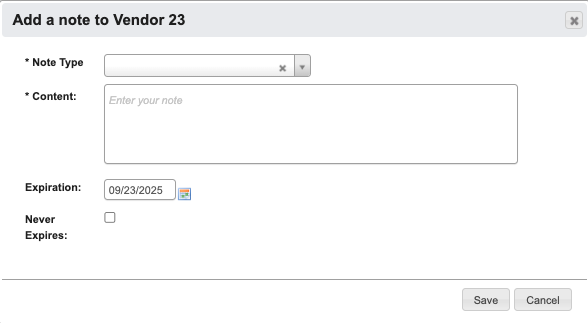
 * `Add Note`: Attaches a note to a Vendor. You can optionally choose an expiration date for the note.
 ### Edit Vendor Toolbar
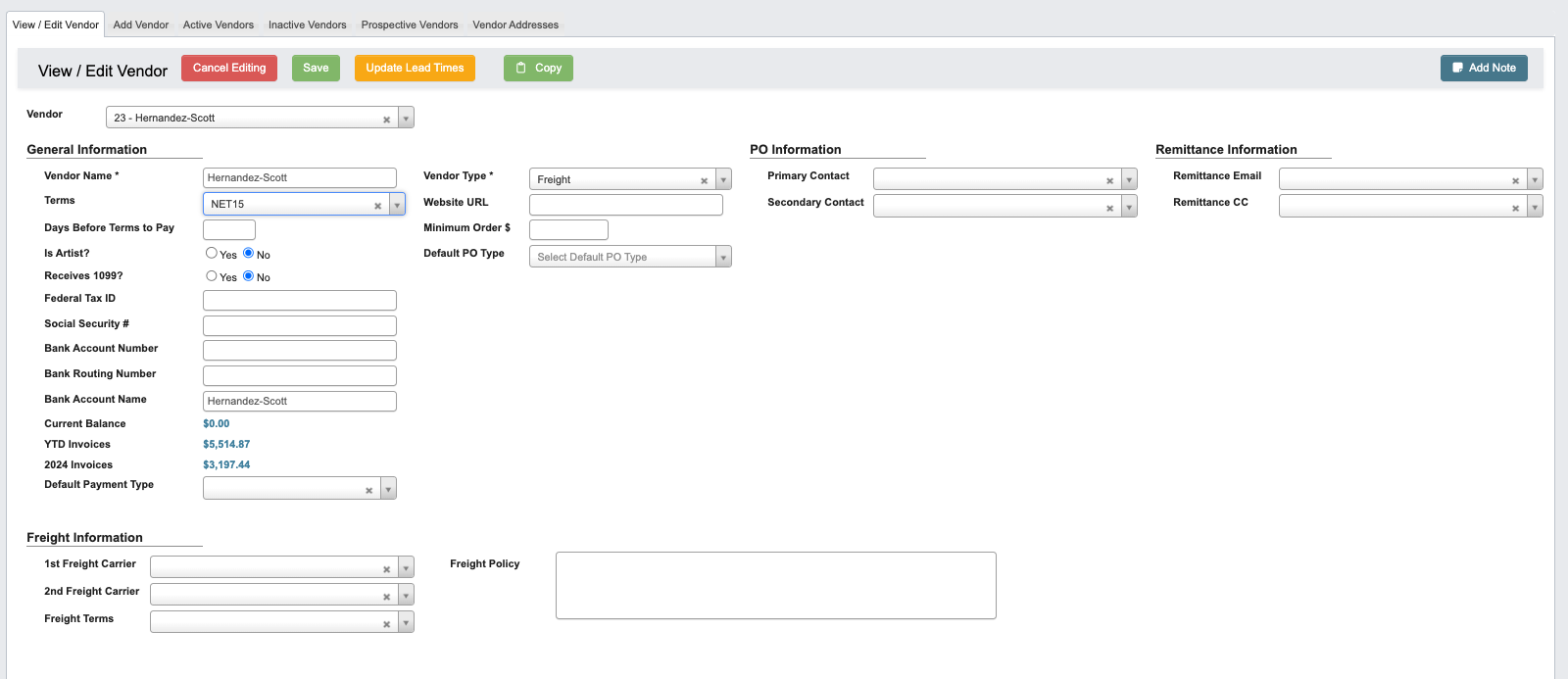
 * `Cancel Editing`: Cancel editing.
* `Save`: Save changed to Vendor.
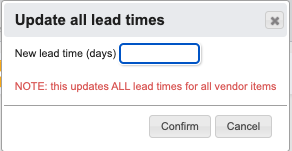
* `Update Lead Times`: To update all lead times for all vendor items.
* `Cancel Editing`: Cancel editing.
* `Save`: Save changed to Vendor.
* `Update Lead Times`: To update all lead times for all vendor items.
 ## Vendor Information
 ### General Information
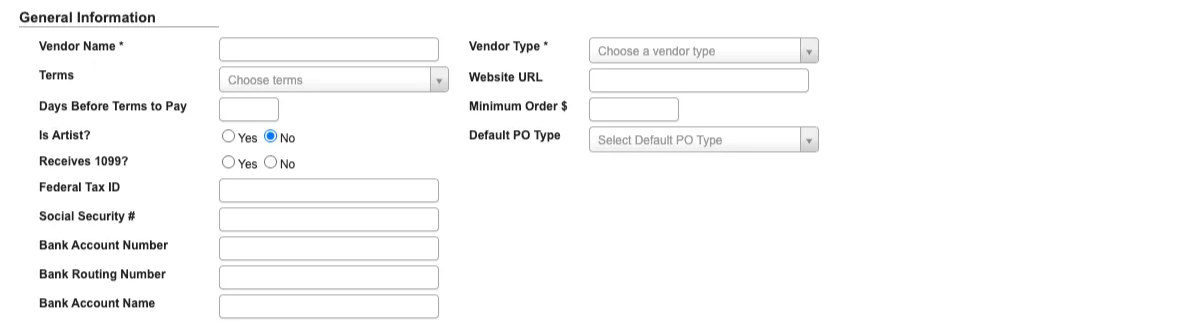 This section captures the core identity and compliance information for a vendor.
* `Vendor Name`: Required field that identifies the vendor across the system.
* `Terms`: Defines the vendor’s payment terms (e.g., Net 30, Net 60).
* `Days Before Terms to Pay`: Indicates how many days in advance the system should schedule payment before the due date.
* `Is Artist?` (Yes/No): Flags vendors classified as artists, allowing for separate reporting and treatment.
* `Receives 1099?` (Yes/No): Marks whether the vendor should be included in year-end 1099 tax reporting.
* `Federal Tax ID / Social Security #`: Captures tax identification for compliance and reporting.
* `Bank Account Number / Routing Number / Account Name`: Stores vendor payment details for ACH or direct deposit.
* `Vendor Type`: Required classification field used for grouping and reporting vendors by category.
* `Website URL`: Stores the vendor’s website for reference.
* `Minimum Order $`: Defines the minimum purchase amount required for an order to be placed with the vendor.
* `Default PO Type`: Sets the standard purchase order type (service or standard) for this vendor.
### PO Information
This section captures the core identity and compliance information for a vendor.
* `Vendor Name`: Required field that identifies the vendor across the system.
* `Terms`: Defines the vendor’s payment terms (e.g., Net 30, Net 60).
* `Days Before Terms to Pay`: Indicates how many days in advance the system should schedule payment before the due date.
* `Is Artist?` (Yes/No): Flags vendors classified as artists, allowing for separate reporting and treatment.
* `Receives 1099?` (Yes/No): Marks whether the vendor should be included in year-end 1099 tax reporting.
* `Federal Tax ID / Social Security #`: Captures tax identification for compliance and reporting.
* `Bank Account Number / Routing Number / Account Name`: Stores vendor payment details for ACH or direct deposit.
* `Vendor Type`: Required classification field used for grouping and reporting vendors by category.
* `Website URL`: Stores the vendor’s website for reference.
* `Minimum Order $`: Defines the minimum purchase amount required for an order to be placed with the vendor.
* `Default PO Type`: Sets the standard purchase order type (service or standard) for this vendor.
### PO Information
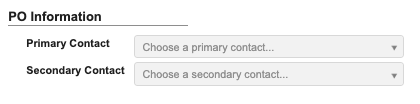 This section identifies the vendor contacts who should receive purchase orders.
* `Primary Contact`: The main point of contact for receiving POs.
* `Secondary Contact`: A backup contact in case the primary is unavailable.
### Remittance Information
This section identifies the vendor contacts who should receive purchase orders.
* `Primary Contact`: The main point of contact for receiving POs.
* `Secondary Contact`: A backup contact in case the primary is unavailable.
### Remittance Information
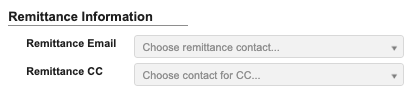 This section defines where payment remittance notices are sent.
* `Remittance Email`: The primary email address for remittance details.
* `Remittance CC`: Additional recipients for remittance notifications.
### Freight Information
This section defines where payment remittance notices are sent.
* `Remittance Email`: The primary email address for remittance details.
* `Remittance CC`: Additional recipients for remittance notifications.
### Freight Information
 This section defines the vendor’s shipping and freight policies.
* `1st Freight Carrier / 2nd Freight Carrier`: Preferred carriers used when routing shipments.
* `Freight Terms`: Defines who is responsible for shipping costs (e.g., prepaid/no charge, collect, prepaid/add).
* `Delivery Fee`: Base freight amount that preloads into Freight Total when this vendor is selected on a new purchase order. The PO amount remains editable and can be changed or removed before saving.
* `Freight Policy`: Captures vendor-specific rules or agreements governing freight and shipping.
### Add Person
This section defines the vendor’s shipping and freight policies.
* `1st Freight Carrier / 2nd Freight Carrier`: Preferred carriers used when routing shipments.
* `Freight Terms`: Defines who is responsible for shipping costs (e.g., prepaid/no charge, collect, prepaid/add).
* `Delivery Fee`: Base freight amount that preloads into Freight Total when this vendor is selected on a new purchase order. The PO amount remains editable and can be changed or removed before saving.
* `Freight Policy`: Captures vendor-specific rules or agreements governing freight and shipping.
### Add Person
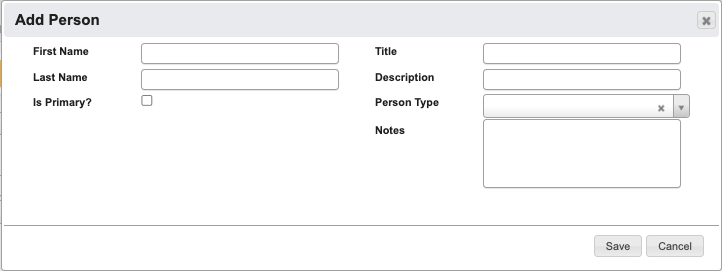 * `First Name` (Required): Contact’s first name.
* `Last Name`: Contact’s last name.
* `Is Primary`: Check this box if this is the primary contact for the vendor.
* `Title`: Contact’s job title or role.
* `Description`: Additional details about the contact.
* `Person Type`(Required): Identifies the role type of the contact (e.g., Billing, Sales Rep).
* `Notes`: Any extra information helpful for working with this contact.
### Add Address
* `First Name` (Required): Contact’s first name.
* `Last Name`: Contact’s last name.
* `Is Primary`: Check this box if this is the primary contact for the vendor.
* `Title`: Contact’s job title or role.
* `Description`: Additional details about the contact.
* `Person Type`(Required): Identifies the role type of the contact (e.g., Billing, Sales Rep).
* `Notes`: Any extra information helpful for working with this contact.
### Add Address
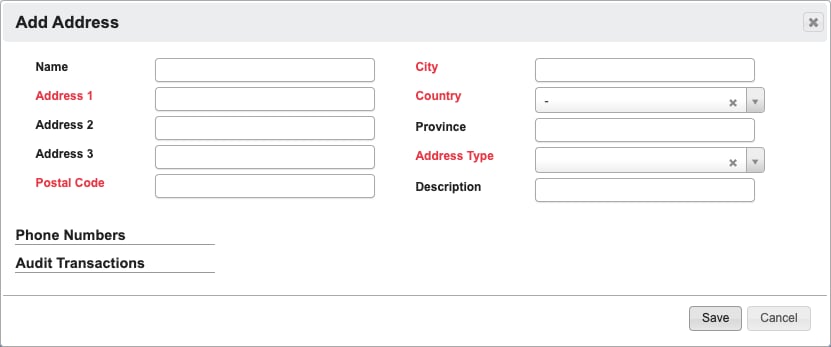
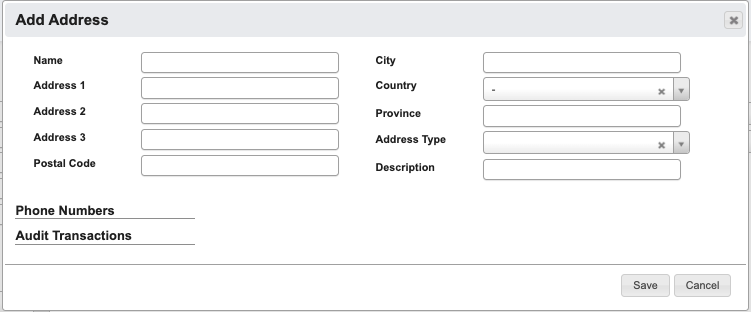 * `Name`: Identifier for the address.
* `Address 1` (required): Primary street address.
* `Address 2`: Additional street information.
* `Address 3`: Additional street information.
* `Postal Code` (required): Postal or ZIP code.
* `City` (required): City of the address.
* `Country` (required): Country of the address.
* `State` / `Province`: For US addresses, a `State` selection is required. For all other countries, the optional `Province` field is shown instead.
* `Address Type` (required): Specifies the address purpose (e.g., Billing, Shipping).
* `Description`: Any other helpful details about the address.
If any required field is missing when you click `Save`, DASH highlights the missing fields in red and does not save the address.
* `Name`: Identifier for the address.
* `Address 1` (required): Primary street address.
* `Address 2`: Additional street information.
* `Address 3`: Additional street information.
* `Postal Code` (required): Postal or ZIP code.
* `City` (required): City of the address.
* `Country` (required): Country of the address.
* `State` / `Province`: For US addresses, a `State` selection is required. For all other countries, the optional `Province` field is shown instead.
* `Address Type` (required): Specifies the address purpose (e.g., Billing, Shipping).
* `Description`: Any other helpful details about the address.
If any required field is missing when you click `Save`, DASH highlights the missing fields in red and does not save the address.
 ### Add Price List
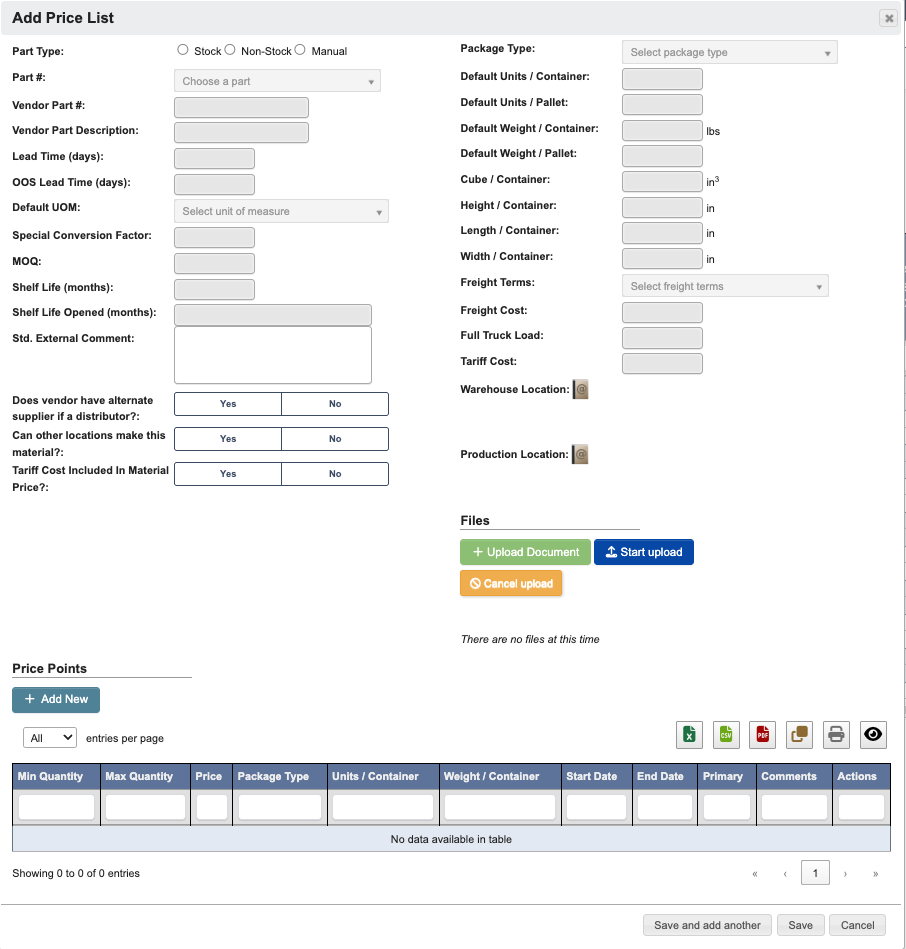 * `Part Type` (Required): Choose a type of part being priced (Stock, Non-Stock, Manual).
* `Part #`: Internal part number.
* `Vendor Part #`(Required): Vendor’s part number.
* `Vendor Part Description`: Description of the part from the vendor.
* `Lead Time (days)`(Required): Expected lead time.
* `OOS Lead Time (days)`: Lead time when out of stock.
* `Default UOM`: Default unit of measure.
* `Special Conversion Factor`: Conversion factor if applicable.
* `MOQ`: Minimum order quantity.
* `Shelf Life (months)`: Shelf life unopened.
* `Shelf Life Opened (months)`: Shelf life once opened.
* `Std. External Comment`: Standard external notes.
* `Does vendor have alternative supplied if a distributor?` (Yes/No)
* `Can other locations make this material?` (Yes/No)
* `Tariff Cost included in material price?`(Yes/No)
* `Package Type`: Packaging type for the part.
* `Default Units / Container`: Number of units per container.
* `Default Units / Pallet`: Number of units per pallet.
* `Default Weight / Container`: Weight of container in pounds.
* `Default Weight / Pallet`: Weight of pallet.
* `Cube / Container`: Volume of container in cubic inches.
* `Height / Container`: Height of container in inches.
* `Length / Container`: Length of container in inches.
* `Width / Container`: Width of container in inches.
* `Freight Terms`: Defines who is responsible for shipping costs (e.g., prepaid/no charge, collect, prepaid/add).
* `Freight Cost`: Vendor specific freight cost.
* `Full Truck Load`: Freight shipping method for large shipments that fill an entire truck.
* `Tariff Cost`: Vendor tariffs.
* `Warehouse Location`: Click the `Addresses` (”Book with @ symbol”) button to choose from the Vendor addresses to set the warehouse location. Click the `Accept` (”Green checkmark”) in the `Actions` column to select an address.
* `Production Location`: Click the `Addresses` (”Book with @ symbol”) button to choose from the Vendor addresses to set the production location. Click the `Accept` (”Green checkmark”) in the `Actions` column to select an address.
* `Also create a Shipping address with the same details` / `Also create a Billing address with the same details`: Available when adding a vendor address with the `Address Type` set to `Billing` or `Shipping`. The checkbox label changes based on the selected address type so you can create the matching billing/shipping address from the same entry.
* `Files`: See this page for reference
* `Price Points`: See the section below for how to add Price Points.
### Add Price Points
* `Part Type` (Required): Choose a type of part being priced (Stock, Non-Stock, Manual).
* `Part #`: Internal part number.
* `Vendor Part #`(Required): Vendor’s part number.
* `Vendor Part Description`: Description of the part from the vendor.
* `Lead Time (days)`(Required): Expected lead time.
* `OOS Lead Time (days)`: Lead time when out of stock.
* `Default UOM`: Default unit of measure.
* `Special Conversion Factor`: Conversion factor if applicable.
* `MOQ`: Minimum order quantity.
* `Shelf Life (months)`: Shelf life unopened.
* `Shelf Life Opened (months)`: Shelf life once opened.
* `Std. External Comment`: Standard external notes.
* `Does vendor have alternative supplied if a distributor?` (Yes/No)
* `Can other locations make this material?` (Yes/No)
* `Tariff Cost included in material price?`(Yes/No)
* `Package Type`: Packaging type for the part.
* `Default Units / Container`: Number of units per container.
* `Default Units / Pallet`: Number of units per pallet.
* `Default Weight / Container`: Weight of container in pounds.
* `Default Weight / Pallet`: Weight of pallet.
* `Cube / Container`: Volume of container in cubic inches.
* `Height / Container`: Height of container in inches.
* `Length / Container`: Length of container in inches.
* `Width / Container`: Width of container in inches.
* `Freight Terms`: Defines who is responsible for shipping costs (e.g., prepaid/no charge, collect, prepaid/add).
* `Freight Cost`: Vendor specific freight cost.
* `Full Truck Load`: Freight shipping method for large shipments that fill an entire truck.
* `Tariff Cost`: Vendor tariffs.
* `Warehouse Location`: Click the `Addresses` (”Book with @ symbol”) button to choose from the Vendor addresses to set the warehouse location. Click the `Accept` (”Green checkmark”) in the `Actions` column to select an address.
* `Production Location`: Click the `Addresses` (”Book with @ symbol”) button to choose from the Vendor addresses to set the production location. Click the `Accept` (”Green checkmark”) in the `Actions` column to select an address.
* `Also create a Shipping address with the same details` / `Also create a Billing address with the same details`: Available when adding a vendor address with the `Address Type` set to `Billing` or `Shipping`. The checkbox label changes based on the selected address type so you can create the matching billing/shipping address from the same entry.
* `Files`: See this page for reference
* `Price Points`: See the section below for how to add Price Points.
### Add Price Points
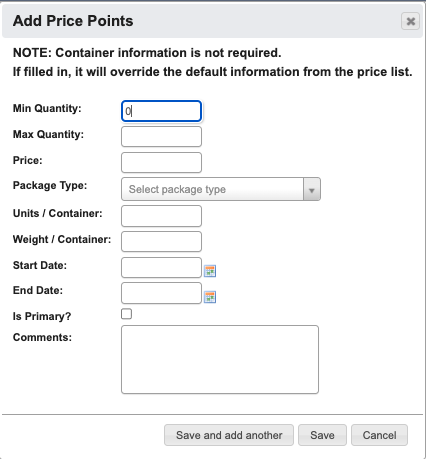 * `Min Quantity`: Minimum quantity for this price point.
* `Max Quantity`: Maximum quantity for this price point.
* `Price`: Unit price for the specified range.
* `Package Type`: Packaging type for the part.
* `Units / Container`: Number of units per container.
* `Weight / Container`: Weight of container.
* `Start Date`: Effective date for the price point.
* `End Date`: Expiration date for the price point.
* `Is Primary`: Mark if this is the primary price point.
* `Comments`: Additional notes or comments about this price point.
* `Min Quantity`: Minimum quantity for this price point.
* `Max Quantity`: Maximum quantity for this price point.
* `Price`: Unit price for the specified range.
* `Package Type`: Packaging type for the part.
* `Units / Container`: Number of units per container.
* `Weight / Container`: Weight of container.
* `Start Date`: Effective date for the price point.
* `End Date`: Expiration date for the price point.
* `Is Primary`: Mark if this is the primary price point.
* `Comments`: Additional notes or comments about this price point.