> ## Documentation Index
> Fetch the complete documentation index at: https://docs.decoart.com/llms.txt
> Use this file to discover all available pages before exploring further.
# Scheduling Reports Submodule
## Overview
The **Scheduling** → **Scheduling Reports** submodule provides key reporting tools for production planning, materials management, and inventory forecasting. These reports are used daily by production schedulers to manage and coordinate complex manufacturing workflows.
It enables schedulers and planners to identify shortages, generate production recommendations, and project quantity-on-hand levels after scheduled runs are completed. The reports integrate with external Excel-based analysis tools and support both automated and on-demand generation.
These reports help answer questions such as:
* “What parts are needed to complete scheduled batches?”
* “What adjustments should be made to maintain target inventory levels?”
* “How will our inventory look once current production is finished?”
* "Which orders require immediate production attention?"
* "What raw materials will purchasing need for upcoming production?"
## Report Options
The submodule contains the following reports:
* **Batch Net Requirements:** Identifies shortages and purchasing needs for work-in-process batches.
* **Batch Ticket Recommendations:** Suggests batch adjustments or new scheduling based on rolling usage data, weeks-on-hand targets, and available quantities.
* **QOH Forecast:** Projects quantity-on-hand after scheduled production using 6- or 12-month rolling usage data.
## How to Generate a Batch Net Requirements Report
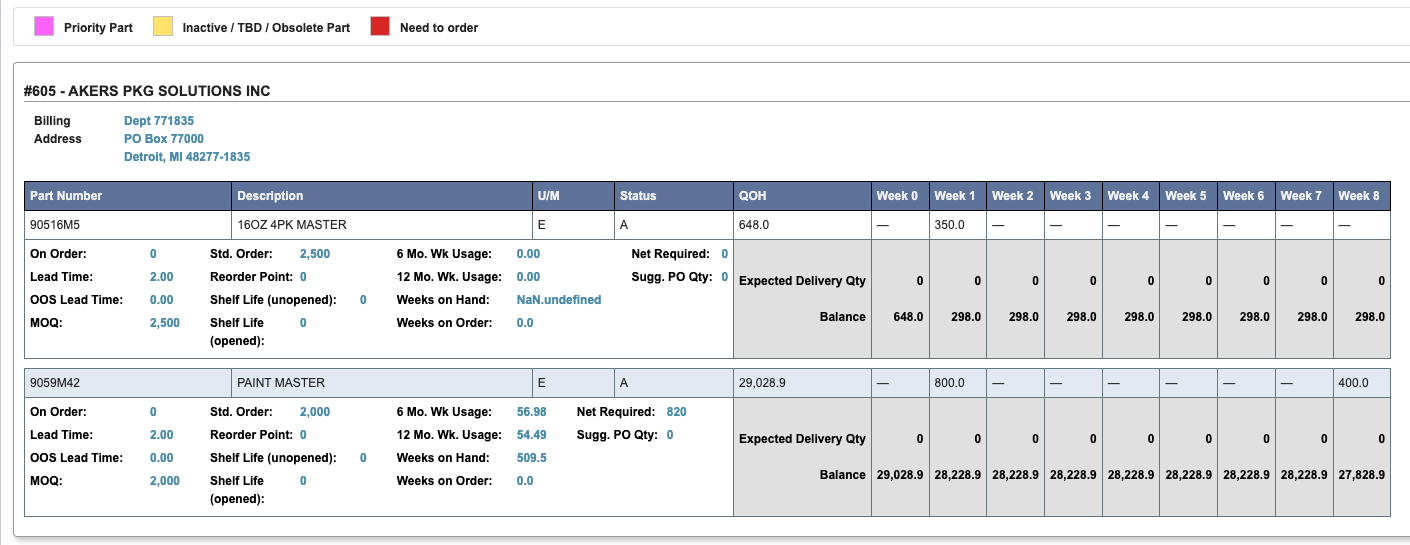
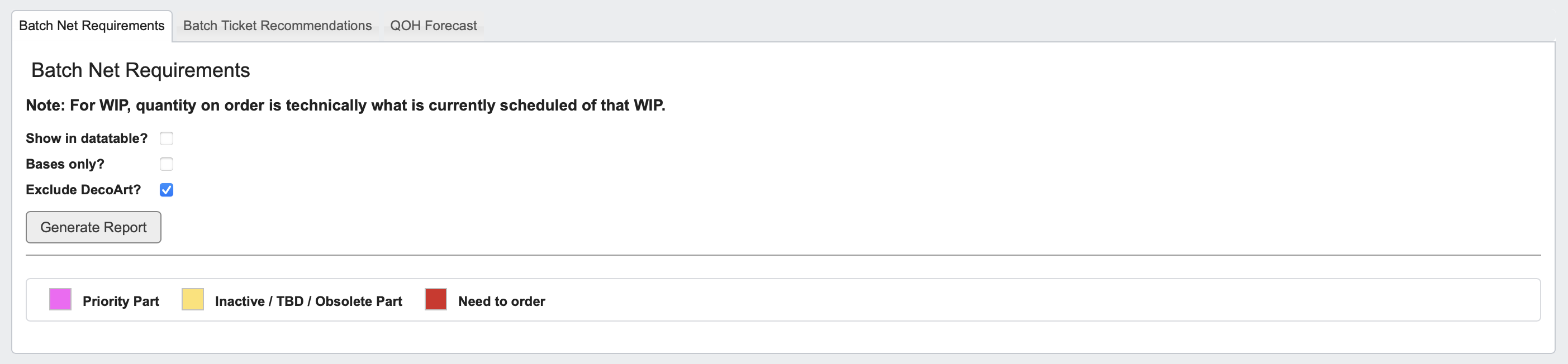 Each vendor will have its own card on this screen, showing all parts associated with that vendor along with their setup details and requirements.
1. Click the `Batch Net Requirements` tab.
2. Choose your report options:
* **Show in datatable:** Display data in table format.
* **Bases only:** Limit to base materials.
* **Exclude \[YOUR COMPANY]:** Omit internal parts.
3. Click `Generate Report` to view Part quantities scheduled and needed, Production Week information, Weekly Usage, and more.
Line items may be highlighted indicating the following:
* Pink: Priority part.
* Yellow: Inactive/obsolete part.
* Red: Part needs to be ordered.
**This report is useful for:** planners and purchasing teams to identify materials that must be ordered or prioritized for production.
Each vendor will have its own card on this screen, showing all parts associated with that vendor along with their setup details and requirements.
1. Click the `Batch Net Requirements` tab.
2. Choose your report options:
* **Show in datatable:** Display data in table format.
* **Bases only:** Limit to base materials.
* **Exclude \[YOUR COMPANY]:** Omit internal parts.
3. Click `Generate Report` to view Part quantities scheduled and needed, Production Week information, Weekly Usage, and more.
Line items may be highlighted indicating the following:
* Pink: Priority part.
* Yellow: Inactive/obsolete part.
* Red: Part needs to be ordered.
**This report is useful for:** planners and purchasing teams to identify materials that must be ordered or prioritized for production.
 ## How to Generate a Batch Ticket Recommendations Report
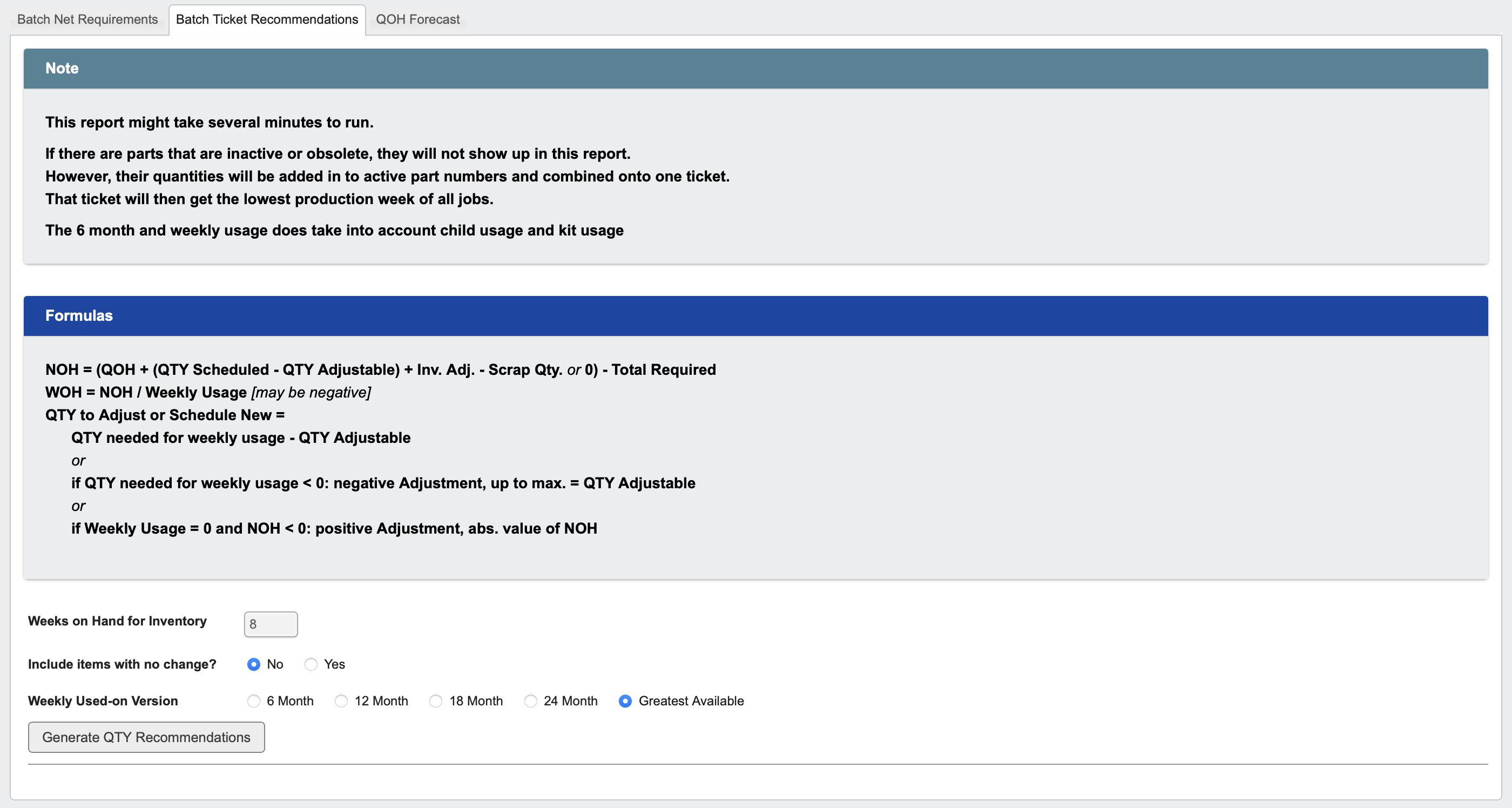 1. Click the `Batch Ticket Recommendations` tab.
2. Calculation formulas are provided for your reference, no action is required on them.
3. Enter key parameters:
* **Weeks on Hand for Inventory:** Target coverage (e.g., 8 weeks).
* **Include items with no change:** Optionally include all items, even those without recommendation differences.
* **Weekly Used-on Version:** Choose a usage range (6-, 12-, 18-, or 24-month; or Greatest Available).
4. Click `Generate QTY Recommendations` to produce the report.
1. Click the `Batch Ticket Recommendations` tab.
2. Calculation formulas are provided for your reference, no action is required on them.
3. Enter key parameters:
* **Weeks on Hand for Inventory:** Target coverage (e.g., 8 weeks).
* **Include items with no change:** Optionally include all items, even those without recommendation differences.
* **Weekly Used-on Version:** Choose a usage range (6-, 12-, 18-, or 24-month; or Greatest Available).
4. Click `Generate QTY Recommendations` to produce the report.
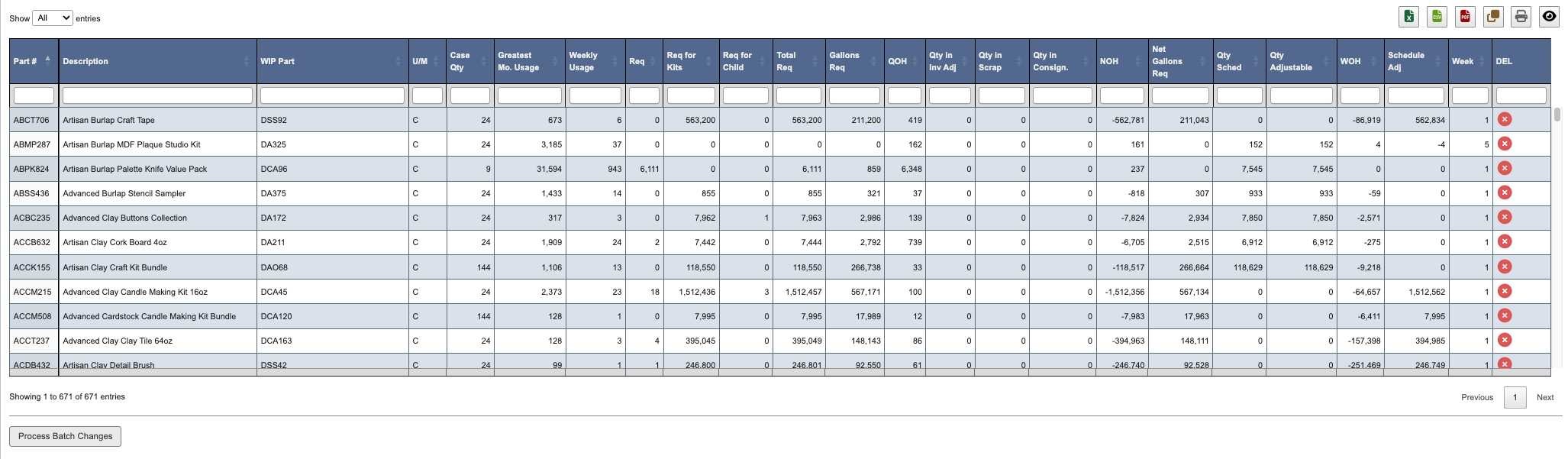 Adjustments can be made directly in the “Schedule Adj.” and “Weeks” columns if you want to modify the system-generated recommendations before processing.
The generated report displays a detailed table of all reviewed parts and their calculated recommendations. Each row lists part-level metrics including usage, requirements, and scheduling adjustments.
Click the `X icon` for a part to remove it from the report. Removed parts appear crossed out and can be restored by clicking the `X icon` again.
When ready, click `Process Batch Changes` at the bottom of the screen. This will apply all recommendations, along with any adjustments made to generate new or updated batch tickets and bottling jobs.
**This report is useful for:** Production schedulers to adjust batch planning and maintain optimal stock levels based on real usage patterns.
## How to Generate a QOH (Quantity on Hand) Forecast Report
Adjustments can be made directly in the “Schedule Adj.” and “Weeks” columns if you want to modify the system-generated recommendations before processing.
The generated report displays a detailed table of all reviewed parts and their calculated recommendations. Each row lists part-level metrics including usage, requirements, and scheduling adjustments.
Click the `X icon` for a part to remove it from the report. Removed parts appear crossed out and can be restored by clicking the `X icon` again.
When ready, click `Process Batch Changes` at the bottom of the screen. This will apply all recommendations, along with any adjustments made to generate new or updated batch tickets and bottling jobs.
**This report is useful for:** Production schedulers to adjust batch planning and maintain optimal stock levels based on real usage patterns.
## How to Generate a QOH (Quantity on Hand) Forecast Report
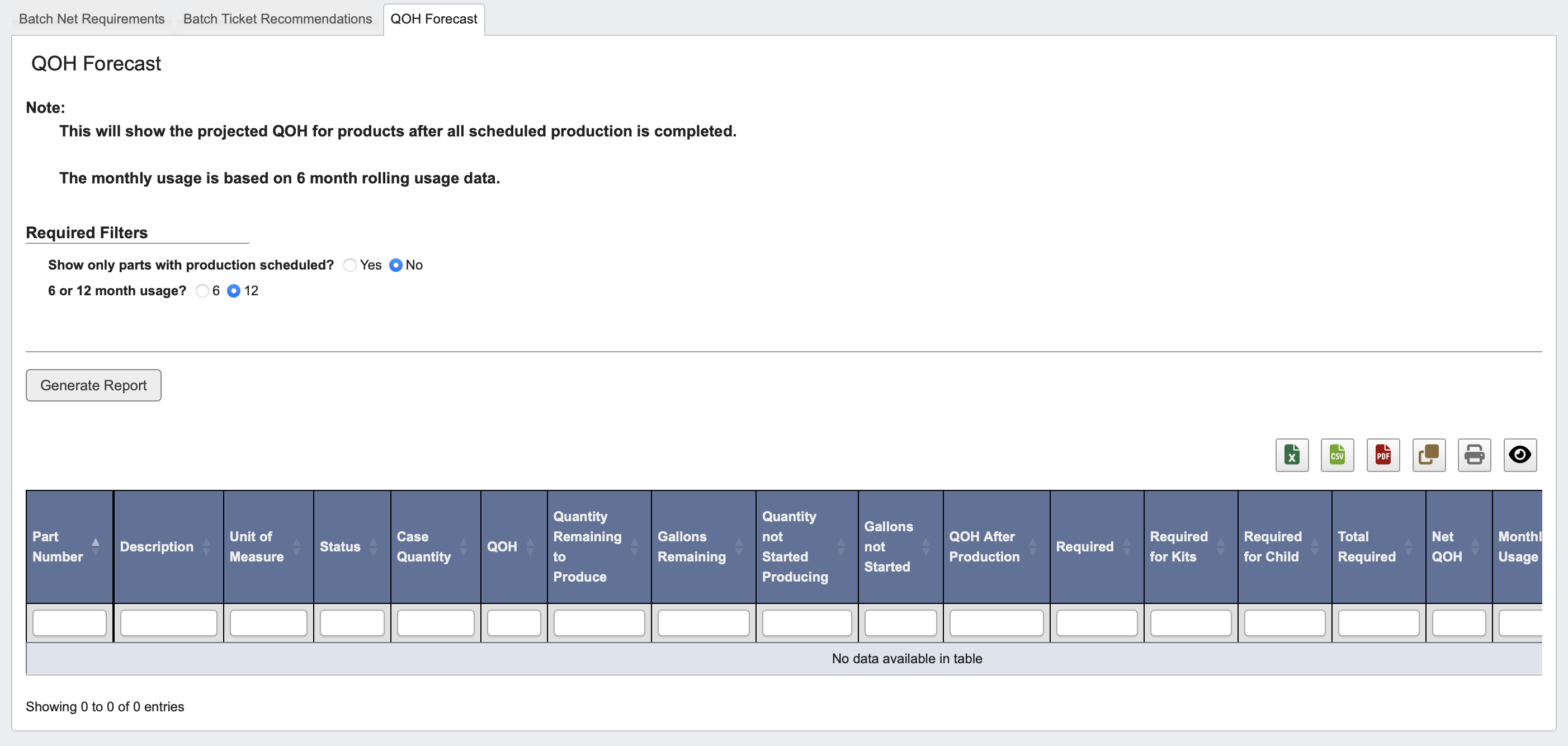 1. Click the `QOH Forecast` tab.
2. Choose filters:
* **Show only parts with production scheduled?:** Yes or No.
* **6 or 12 month usage?:** Select usage window for forecasting.
3. Click `Generate Report` to view projected post-production inventory levels.
**This report is useful for:** inventory analysts and production planners to forecast finished goods availability and align production timing with demand.
1. Click the `QOH Forecast` tab.
2. Choose filters:
* **Show only parts with production scheduled?:** Yes or No.
* **6 or 12 month usage?:** Select usage window for forecasting.
3. Click `Generate Report` to view projected post-production inventory levels.
**This report is useful for:** inventory analysts and production planners to forecast finished goods availability and align production timing with demand.