Work Order Information
Production Screens below may vary depending on the type of production.
General Information:
This card contains basic identity and classification fields for the work order.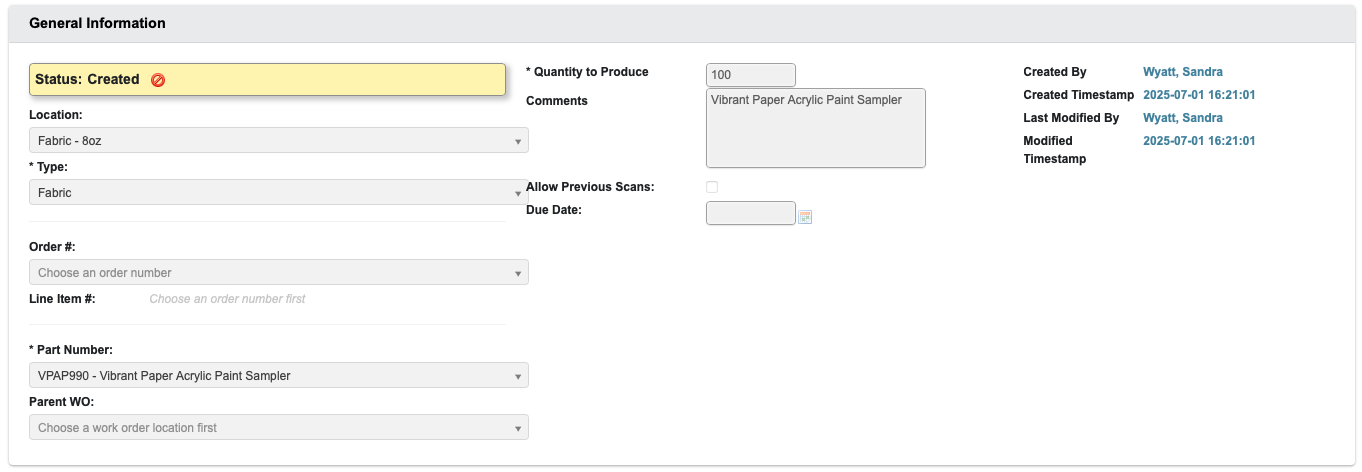
Status: Indicates the lifecycle state of the work order (e.g., Created, In Progress, Completed). Determines whether production can be started.Location: The work center, department, or shop floor area where the job will be carried out.Type: Classifies the work order by its production category.Order #: Associates the work order with a customer or internal sales order.Line Item #: The specific order line this work order fulfills. This field becomes available once an order number is chosen.Part Number: The product, component, or subassembly being produced. This is required for all work orders.Parent WO: Links this order to a parent work order, which can be useful for assemblies or staged manufacturing processes. On production selection screens, child work orders stay hidden until the parent work order is complete.Quantity to Produce: Defines the number of units to be produced.Comments: Text field for operator or scheduling notes.Allow Previous Scans: Checkbox to allow reuse of previous barcode/scan data in production.Due Date: The target completion date for the order. Used in scheduling.- Audit Fields: Automatically populates and tracks
Created By,Created Timestamp,Last Modified By, andModified Timestamp information.
Overall Metrics
This card summarizes operational performance once production begins.
Scheduled Quantity: Number of units planned for production. Matches the Quantity to Produce in General Information.Qty Produced: Live count of units completed against the scheduled amount.Last Qty Produced: The amount completed in the most recent production run.Total Running Time: Cumulative machine or work center run time logged.Total Setup Time: Time spent preparing machines or materials.Total Lunch Time: Logged downtime for lunch or breaks.Total Downtime: All other stoppages not classified as running, setup, or lunch.Number of Runs: How many distinct production runs have been recorded.Last Run Labor: Labor hours charged in the most recent run.Anticipated Labor: Estimated labor needed to complete the order.Total Labor: Sum of all logged labor hours.Efficiency: System-calculated percentage comparing actual output to planned time and labor.
Components
This card tracks the individual materials or sub-items required to complete a work order. Components represent the building blocks of kits, paint mixes, and finished goods, and their availability directly impacts production scheduling.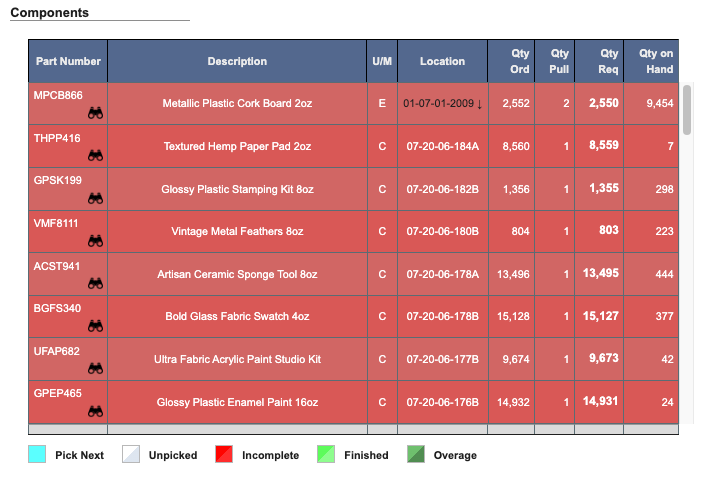
- Pick Next: Components scheduled to be picked next in the process.
- Unpicked: Components not yet allocated.
- Incomplete: Components with shortages or outstanding issues that must be resolved.
- Finished: Components fully picked and used in production.
- Overage: Components picked in excess of the required amount.
Picking components by eaches
Kits and paint mixes frequently need part of a case rather than a whole one. A kit calling for three jars of a thirty-per-case component needs 0.15 cases, and picking a full case instead overstates the material consumed and throws off inventory. The Pick Components grid lists the component’s Case Qty alongside its unit of measure. Wherever a quantity works out to a fraction of a case, DASH leads with the whole number of eaches and shows the case figure beside it as a smaller note, so0.15 cs of a thirty-per-case component reads as 3 ea (0.15 cs). Quantities that land on whole cases are
shown as plain case counts.
The Currently Picking dialog applies the same treatment to Qty Needed, Qty Scheduled, Qty on Pallet, and Qty On Hand.
Picks are recorded in cases, so Cartons Picked is always available. When the quantity needed is a fraction of a case,
the dialog adds an Eaches Picked field above it and puts the cursor there, since that is the count a picker is working
from at the shelf. The two fields stay in sync — entering a quantity in either one updates the other using the
component’s case quantity — so a picker can count jars while DASH records the fractional case actually consumed. Whole-
case picks show only Cartons Picked.
Production Info
This card logs the actual execution history of the work order.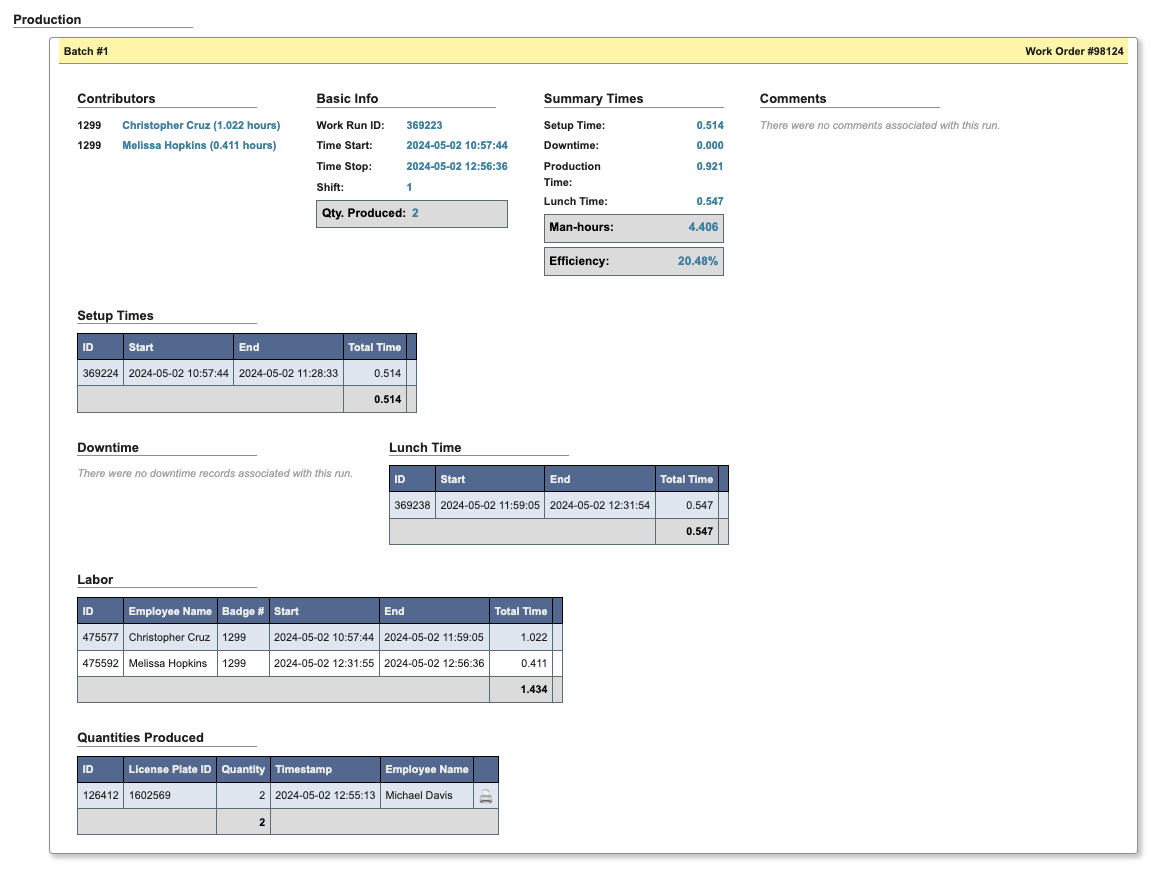
- Top row:
Batch #,Work Order # - Contributors: Lists employees who contributed labor to this run, along with their total recorded hours.
- Basic Info: Provides the core details of the production run.
Work Run ID: Unique identifier for the run (468554).Time Start / Time Stop: Exact start and end times of the run.Shift: Shift number the run was recorded under.Qty. Produced: Total quantity completed during the run.
- Summary Times: Aggregates recorded time categories across the run.
Setup Time: Time spent preparing equipment or materials.Downtime: Non-productive time due to issues or stoppages.Production Time: Active time producing items.Lunch Time: Time logged for meal breaks.Man-hours: Total labor hours logged (sum across employees).Efficiency: Ratio of production output to expected performance.
- Comments: Captures notes or issues recorded during the run.
- Setup Times: Table that tracks the setup intervals recorded for the run.
- Downtime: Logs periods when production was halted. Each record includes the reason and duration.
- Lunch Time: Tracks scheduled lunch breaks taken during the run.
- Labor: Table that lists employee work sessions logged against the run.
- Quantities Produced: Table that tracks all recorded production entries for the run.
Work Order Production Information
The screen will display detailed information including: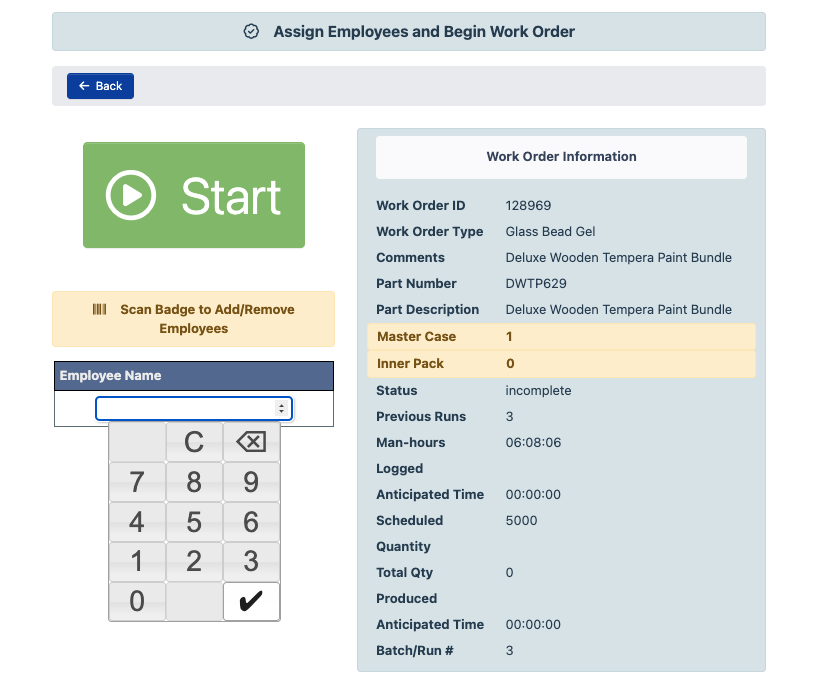
Work Order ID: A unique identifier assigned to each work order. Used to track and reference the specific job throughout the system.Work Order Type: A classification that defines the nature of the work being performed (e.g., assembly, packaging, rework). This determines how the order is processed and displayed in the production module.Comments: Optional notes added by schedulers, operators, or supervisors. Often used to communicate special instructions, warnings, or context for the work order.Part Number: A unique code representing the item, product, or component being manufactured or assembled.Part Description: A plain-language description of the part associated with the work order. This helps operators quickly recognize what is being produced.Master Case: Specifies how many individual items are packed together in one outer (master) shipping case.Inner Pack: Defines the number of units grouped inside an intermediate package within the master case. Used for tracking packaging configurations.Status: Indicates the current state of the work order (e.g., Scheduled, In Progress, Complete). Status is updated automatically as work progresses.Previous Runs: The number of production runs that have already been logged for this work order. Each run typically represents a distinct work session or shift.Man-hours: The total labor hours logged by employees working on the order. Calculated as number of people × time worked.Logged: The cumulative time already recorded by contributors on this work order. Typically displayed in hours and minutes.Anticipated Time: An estimate of how long the work order is expected to take, based on standard rates or past performance.Scheduled: The total quantity of units that need to be produced under this work order.Quantity: In this context, likely refers to the unit count for the current production batch. May also be used as a general label for quantity fields on screen.Total Qty: The full number of units completed and logged so far against the scheduled quantity.Produced: The number of units completed in the current batch or run.Batch / Run #: A sequential number identifying the current production batch or session. Used to distinguish between multiple runs under the same work order.