Key Batch Information
Each batch ticket contains:WIP Part Number: The work-in-process part being produced.Unit of Measure: Production measurement units.Standard Yield: Expected production output.Scheduled Yield: Planned production quantity.Production Week: Target production timeframe.Special Instructions: Custom manufacturing notes.Batch Number: Unique identifier for tracking.
Batch Status Categories
Batch tickets can have various status designations that indicate their current stage in the production process:Production Statuses:
Scheduled: Batches created and scheduled for production.Printed: Batch tickets printed for production floor use.In Process: Batches currently being manufactured.Ready to Tint: Batches ready for color tinting.Complete: Finished batches.
Quality Control Statuses:
Pending QC: Batches awaiting quality control testing.QC Delayed: Batches experiencing QC testing delays.QC Rejected: Batches that failed quality control standards.
Post-QC Statuses:
Dispersed: Batches completed and ready for bottling.Bottling Begun: Batches in bottling operations.Bottling Hold: Batches temporarily on hold during bottling.In Consignment: Batches in consignment status.
Exception Statuses:
Dispersion Delayed: Batches experiencing production delays.
Bulk Batch Functions
The Bulk Batch Functions tab allows you to perform operations on multiple batch tickets simultaneously, improving efficiency when managing large production schedules.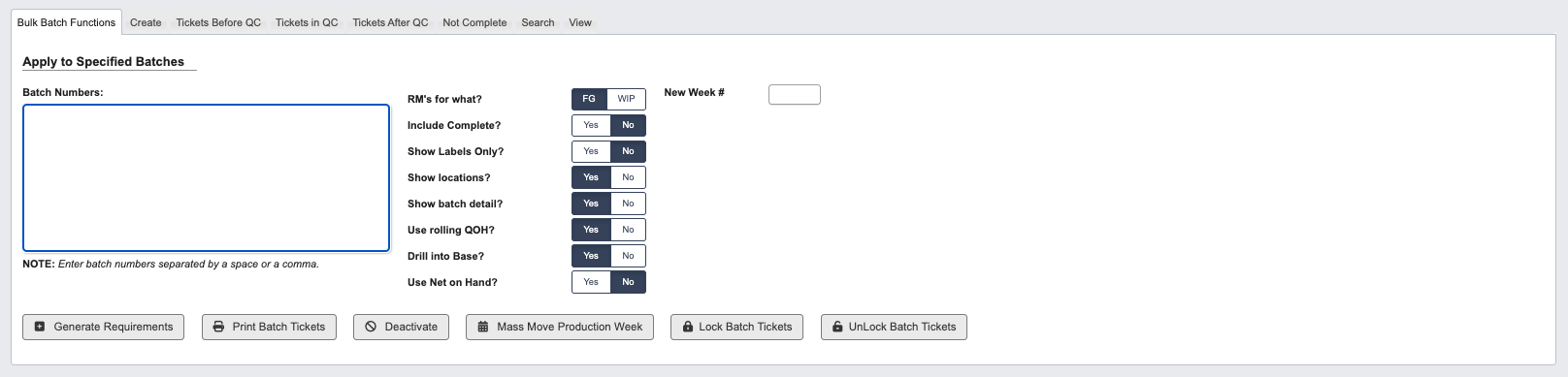
Apply to Specified Batches:
Configure bulk operations by setting the following parameters:Batch Numbers: Enter batch numbers separated by spaces or commas.RM's for what?: Specify if raw materials are for Finished Goods (FG) or Work-in-Process (WIP).Include Complete?(Yes/No): Choose whether to include completed batches in the operation.Show Labels Only?(Yes/No): Display only label information when generating results.Show locations?(Yes/No): Include location data in the output.Show batch detail?(Yes/No): Display detailed batch information in results.Use rolling QOH?(Yes/No): Apply rolling quantity-on-hand calculations for inventory.Drill into Base?(Yes/No): Include base material details in the analysis.Use Net on Hand?(Yes/No): Apply net-on-hand inventory calculations.New Week #: Assign new production week number for rescheduling batches.
Generate Requirements: Generate table with material requirements for selected batches.Print Batch Tickets: Print physical tickets for production floor use.Deactivate: Remove batches from active production.Mass move Production Week: Reschedule multiple batches to different production weeks.Lock Batch Tickets: Prevent modifications to batch tickets.UnLock Batch Tickets: Allow modifications to previously locked tickets.
Batch Search Options
Available Filters
Status(es): Filter by one or multiple production statuses.WIP Part #: Search by work-in-process part number.Direct RM / Base: Filter by raw material or base components.Batcher: Search by assigned production personnel.Include base tickets?(Yes/No): Include or exclude base batch tickets.Base Batch #: Search by base batch number.Batch ticket created: Filter by creation date.Dispersion release date from: Filter by dispersion completion date.QC release date from: Filter by quality control completion date.Complete date from: Filter by final completion date.
View Batch Ticket
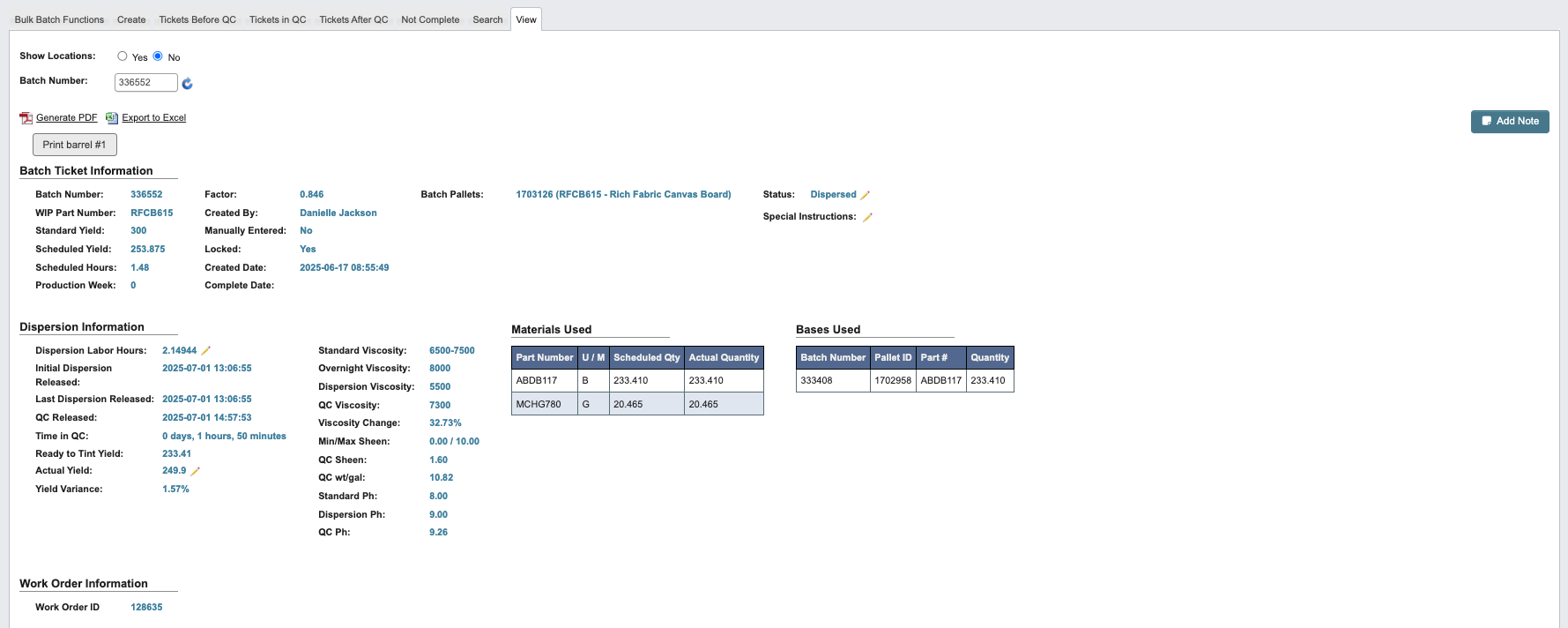
Show Location(Yes/No): Include location data in the output.Batch Number: Enter batch number.Generate PDF: Link to Generate a PDF of the Batch Ticket.Export to Excel: Link to Export the Batch Ticket to an Excel spreadsheet.
Batch Ticket Information
Batch Number: Enter batch number.WIP Part Number: Search by work-in-process part number.Standard Yield: Expected production output.Scheduled Yield: Planned production quantity.Scheduled Hours: Estimated time required to complete the batch production.Production Week: Target production timeframe.Factor: Production scaling factor applied to the batch calculations.Created By: User who created the batch ticket.Manually Entered: Indicates if batch data was entered manually rather than system-generated.Locked: Locked Batch Ticket prevents further modifications.Created Date: Date and time when the batch ticket was created.Complete Date: Date and time when the batch was completed.Batch Pallets: Number of pallets associated with this batch.Status(Editable): Production StatusSpecial Instructions(Editable): Additional instructions for this batch.
Dispersion Information
Dispersion Labor Hours(Editable): Total labor hours spent on dispersion operations.Initial Dispersion Released: Date and time when the batch was first released from dispersion.Last Dispersion Released: Date and time of the most recent dispersion release.QC Released: Date and time when quality control testing was completed and batch was released.Time in QC: Duration the batch spent in quality control testing.Ready to Tint Yield: Yield for batches ready for color tinting.Actual Yield(Editable): Actual Yield for batches.Yield Variance: Difference between actual yield and scheduled yield.Standard Viscosity: Target viscosity specification for the batch.Overnight Viscosity: Viscosity measurement taken after overnight settling.Dispersion Viscosity: Viscosity measured immediately after dispersion process.QC Viscosity: Final viscosity measurement taken during quality control testing.Viscosity Change: Difference between initial and final viscosity measurements.Min/Max Sheen: Acceptable sheen range specification for the product.QC Sheen: Actual sheen measurement recorded during quality control.QC wt/gal: Weight per gallon measurement taken during quality control testing.Standard pH: Target pH specification for the product.Dispersion pH: pH measurement taken after dispersion process.QC pH: Final pH measurement recorded during quality control testing.
Materials Used
- Table with part number, unit of measure, scheduled quantity, actual quantity used in production.
Bases Used
- Table with batch number, pallet ID, Part #, quantity of base materials consumed.
Work Order Information
Work Order ID: Associated work order identifier linking the batch to customer orders.
Bottling Jobs
Add Bottling Jobsbutton.- Table with bottling job information: Bottling Job ID, Part Number, Description, Gallons Ordered, Quantity Ordered, Quantity Bottled, Gallons Bottled, Special Instructions, Status.
Batch Requirements
- Show Locations button, updates tables to show locations.
- Raw Material Requirements Table: Part #, Description, Status, Quantity Required, Quantity on Hand, Net Needed, Locations.
- Label Requirements Table: Label, Foil, FG Part #, Batch #, Bottling Jobs, Quantities Required, Total Quantity Required, Quantity on Hand, Quantity Checked Out, Net Needed, Print Locations.
- Per Job Requirements Table: Bottling Job, Component, Description, Quantity Required, Quantity On Hand, Batch Ticket.
Batch Ticket History
- Table with Action, User Comment, User, Employee #, Employee Name, Timestamp.