Part Information
This reference provides comprehensive field definitions and section explanations for all part information forms in DASH. Available fields change depending on theInventory Type (FG, RM, WIP) and Production Type (Manufactured or Purchased).
Fields marked as “FG Only” are visible only for Finished Goods. Similarly, BOM and MRP System will only show up for manufactured parts.
General Information
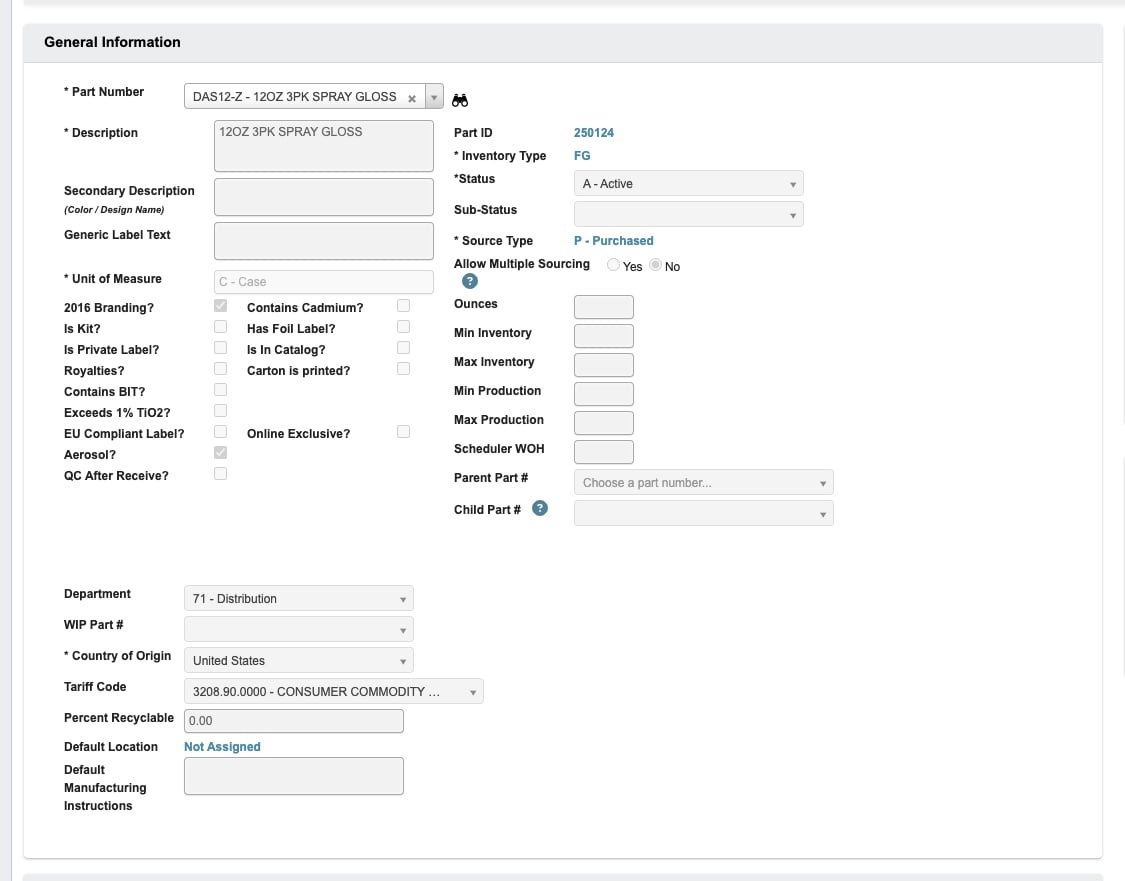
Part Number(Required): A unique code representing the part. Format: Product family prefix (DA - for DecoArt) + Next available number +Item TypeCode (for FG). See Part Information → Maintenance → Item Types tab for Type Codes.Description(Required): A brief description of the part. This text will be printed on the master carton label.Secondary Description: Additional descriptive information such as color or design name. This will be printed on the master carton.Generic Label Text: Color name or text that will be printed on generic labels.Unit of Measure(Required): Choose from a dropdown, how this item will be sold (e.g. Each, Case, Pounds).2016 Branding?(Default checked): Indicated updated branding.Contains Cadmium?: Regulatory compliance flag for Cadmium.Is Kit?: If checked, eliminates need to enter WP (or WIP) part number for paint barrel.Has Foil Label?: Indicates special label type.Is Private Label?: Customer specific branding.Is In Catalog?: Available in product catalog.Royalties?: Subject to royalty payments.Carton is printed?: Custom carton printing required.Contains BIT?: Flag indicating the part contains a BIT (benzisothiazolinone) raw material — component parts 105B, 1307B, or 1339B.Exceeds 1% TiO2?: Titanium dioxide content threshold.EU Compliant Label?: European Union regulatory compliance.Online Exclusive?: Available only through online channels.Aerosol?: Marks the part as an aerosol spray. When an aerosol part is added to an order shipping outside the US, order entry pops up a reminder to check whether a language-specific label item number (e.g. Spanish, Hebrew, or Canadian variant) should be used instead.Inventory Type(Required): Determines the part category and available fields. (RM - Raw Material, FG - Finished Goods or WP - Work in Process)Status(Required): Current status of the part. WhenActive, some fields are auto generated. (A - Active, I - Inactive, O - Obsolete, T - To Be Discontinued or Z - Draft).Sub-Status: Additional status classification for specific business needs.Production Type(Required): Defines how the part is obtained. (P - Purchased or M - Manufactured).Ounces: Product size in ounces.Min Inventory: Minimum inventory level for scheduling purposes.Max Inventory: Maximum inventory level for scheduling purposes.Min Production: Minimum production quantity for scheduling purposes.Max Production: Maximum production quantity for scheduling purposes.Parent Part #(FG Only): Master part number that contains child parts.Child Part #(FG Only): Individual parts that make up a master case (e.g., 6-pack inners within a 24-pack master).Department: Department that uses this part. Affects scheduling and determines which schedule the part appears on.WIP Part #: Associated work-in-process part number. Typically created when new product development creates a part. Lab develops WIP and assigns part number.Country of Origin(Required): Country where item is manufactured. For purchased items, this is the country of purchase.Tariff Code: Select from available tariff codes in the system. Choose the code most closely related to the item being created. Most finished good paints use a standard code, with variations for different product types.Percent Recyclable: Environmental compliance information.Default Location: Standard storage location.Default Manufacturing Instructions: Standard production notes.
Finished Good Information (FG Only)
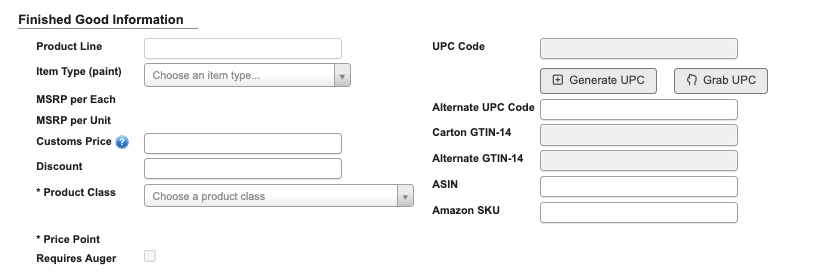
Product Line: Product family classification.Item Type: The item type that matches the product, this will affects FG part costing calculations.MSRP per Each: Manufacturer’s Suggested Retail Price per individual unit, automatically calculated byPrice PointandItem Type.MSRP per Unit: Price per unit of measure, automatically calculated byPrice PointandItem Type.Customs Price: Value used on no-charge international orders for customs invoicing, not charged to the customer.Discount: Discount percentage, if applicable.Product Class(Required): Classification for pricing and reporting purposes.Price Point(Required): Options available after selecting aProduct Class.Requires Auger: Indicating special handling requirementsUPC Code: Universal Product Code, generated or retrieved based on part number.Generate UPCButton: Generates a new UPC Code.Grab UPCButton: Copies UPC from parent/child parts to ensure matching codes.
Alternate UPC Code: Customer-specific UPC codes.Carton GTIN-14: Global Trade Item Number, automatically assigned when part is activated.Alternate GTIN-14: Customer-specific GTIN code.ASIN: Amazon Standard Identification Number.Amazon SKU: Stock Keeping Unit for Amazon marketplace.
Package Information
Enter the part’s physical and dimensional data for shipping calculations, storage planning, and compliance requirements.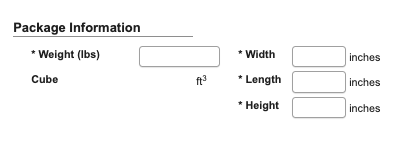
Weight (lbs)(Required): Total weight of the packaged product. Based on weight per gallon of the WIP part used in production.Cube: Volume in cubic feet (automatically calculated from dimensions)Width(Required): Master carton width in inches.Length(Required): Master carton length in inches.Height(Required): Master carton height in inches.Inner Pack(FG Only): Number of units in inner packaging.Master Case(FG Only): Number of units in master case.
Pallet Information (FG Only)
Used primarily by the bottling department for production planning and quality control. The pallet information serves as a quality control check during production. When creating pallet tags, the system alerts operators if they exceed the maximum allowed quantity per pallet, helping prevent errors and ensuring proper handling.
Layers per Pallet: Auto-calculated based on inner pack, master case, and pallet type.Qty per Layer: Auto-calculated quantity per pallet layer.Qty per Pallet: Total quantity that fits on one pallet.Pallet Type: Standard pallet sizes (Large 40X48 or Stock 30X36)
Costs
Define standard, current, and future cost elements for accurate costing, margin tracking, and forecasting.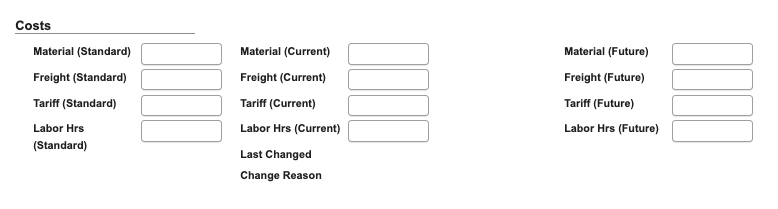
Material (Standard): Standard material cost baseline.Freight (Standard): Standard shipping cost baseline.Tariff (Standard): Standard tariff cost baseline.Labor Hrs (Standard): Standard labor hours for production.Material (Current): Current material cost (For purchased items).Freight (Current): Current freight cost (For purchased items).Tariff (Current): Current tariff cost (For purchased items).Labor Hrs (Current): Current labor hours (For manufactured parts).Material (Future): Projected future material costs.Freight (Future): Projected future freight costs.Tariff (Future): Projected future tariff costs.Labor Hrs (Future): Projected future labor requirements.Last Changed: Date of most recent cost update.Change Reason: Explanation for cost modification.
Costing Info
Displays cost summary and forecasting details derived from costing updates.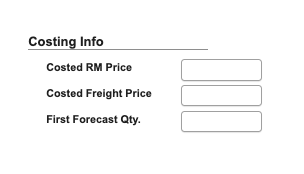
Costed RM Price: Calculated raw material price.Costed Freight Price: Calculated freight cost.First Forecast Qty.: Initial forecast quantity for planning purposes.
Purchasing Information (Purchased Only)
Purchasing-specific details including preferred vendors, lead times, and standard order quantities.
Standard Order: The default quantity typically ordered from the vendor for this part.Lead Time (Weeks): The average number of weeks required for the vendor to deliver the part after an order is placed.Material Type: Classifies the part by its material category or type.Manufacturer: The primary manufacturer or producer of the part.Manufacturer 2: Secondary manufacturer option.Vendor: The vendor for this part.Alternate Vendor: An optional backup supplier that can fulfill the same part when the primary vendor is unavailable.Bradshaw PLC is Vendor: Checkbox indicating whether the part is internally sourced from Bradshaw PLC rather than an external supplier.Sub Line:Torque Requirement: Indicates whether the part requires a specific torque specification for assembly or usage.Conversion Factor: Defines the conversion ratio between the vendor’s unit of measure and DASH’s internal unit of measure.
Cost Metrics
Provides cost analysis and metrics including cost trends, variances, and profitability data for the part.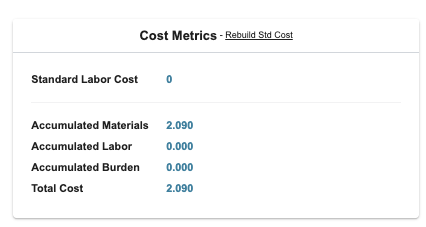
Purchased Materials Metrics (Purchased Only)
This shows only for purchased and displays key metrics and performance data for purchased materials including lead times, supplier performance, and purchasing history.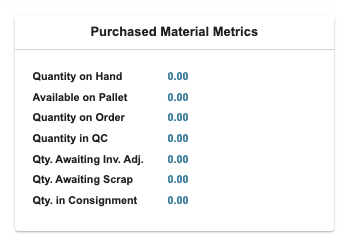
FG Metrics (FG Only)
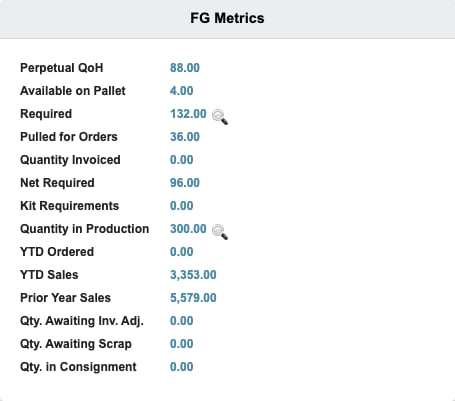
Shows finished goods metrics including sales performance, inventory turnover, and production statistics for finished goods parts.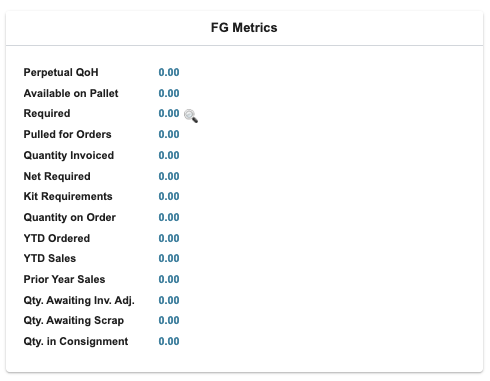
Quantity in Production replaces Quantity on Order. It totals the quantity still to be produced (scheduled or ordered quantity minus the quantity produced so far) across:
- Open work orders for the part (any status other than complete). Rework work orders are not counted because they return the same inventory they consume.
- Open bottling jobs for the part (any job status other than Complete or Closed, on an active batch ticket).
Quantity on Order and Quantity in Production.
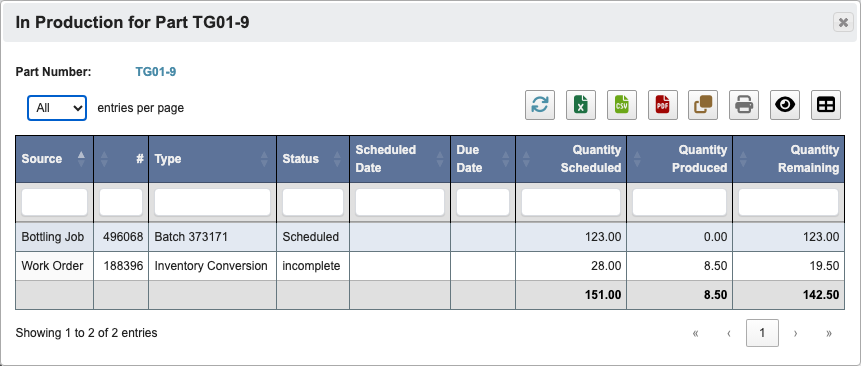
Quantity in Production to open the work orders and bottling jobs that make up the total. Each row shows its source, work order or bottling job number, type (work order type or batch number), status, scheduled and due dates, and scheduled, produced, and remaining quantities.
BOM Transactions (Manufactured Only)
Shows transaction history for bill of materials changes including additions, modifications, and deletions of components.
Bill of Materials / MRP System (Manufactured Only)
Defines the components and messages used by a manufactured part. In edit mode, useScrap Amount when the entered quantity represents scrap. Rows marked this way show a checkmark in the Scrap column and are saved separately for manufactured and toll-manufactured BOM views.
BOM Versions (Manufactured Only)
Tracks different versions of the Bill of Materials as changes are made over time. This allows you to maintain historical records of component changes and provides flexibility when working with products still in development. When pitching new products to customers, you can provide preliminary information like part numbers, UPC codes, and basic dimensions even while the formula is still being finalized, without having all components active in the MRP system.
Parts Attached To (Manufactured Only)
Shows what other parts this component is used in, providing visibility into where this Part is consumed in the manufacturing process.
Company Divisions
Specifies which company divisions this part applies to and any division-specific requirements or configurations.
Vendor Information
Details about suppliers and vendors for this part including contact information, terms, and vendor-specific part numbers.
Purchase History
Historical purchasing data including past orders, quantities, prices, and supplier performance over time.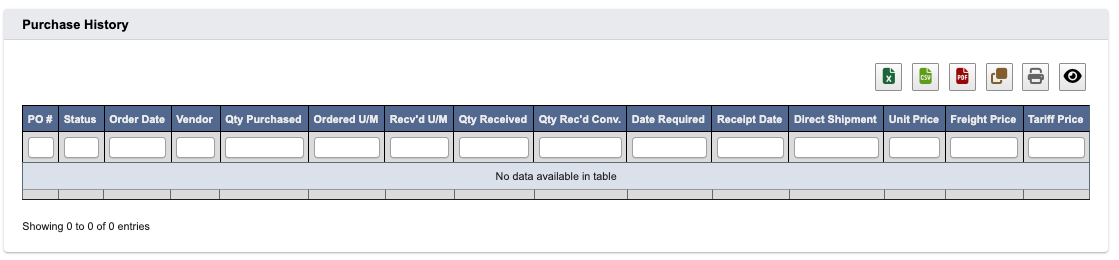
Yearly Summary
Annual summary data including usage quantities, costs, and trends for year-over-year analysis and planning.
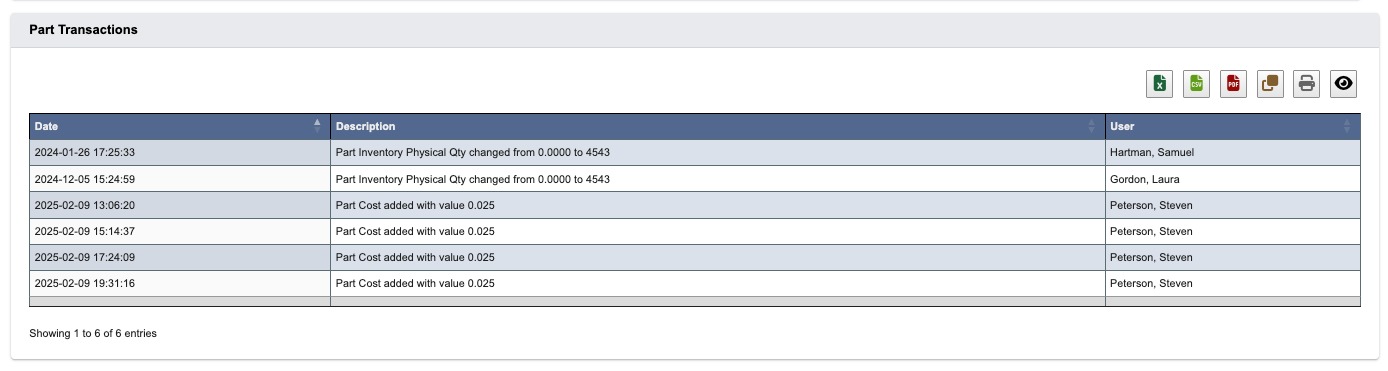
Part Transactions
The section shows all changes, who made them, and when.